Desk Decor Studio
Reviews
Desk Decor Studio succeeds as a low-pressure creative outlet because it removes everything that usually interrupts decoration games: no timers, no locked items, no scores. The drag-and-drop placement works on both desktop and mobile, and the item variety covers common workspace objects. The main limitation is that the game offers no built-in gallery or direct sharing, so you rely on screenshots. It suits players who enjoy interior design or organization and want a quick, relaxing activity.
Description
Designing Your Workspace
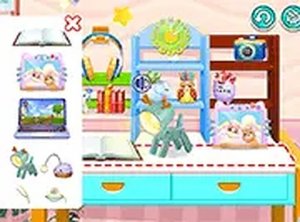
Desk Decor Studio gives you a blank desk and a library of decorative objects. Your only objective is to arrange them into a workspace that feels right to you. The game includes books, lamps, clocks, laptops, and plants, and you can place any item anywhere on the desk surface. There are no preset slots or grid restrictions, so the layout is entirely your decision. [IMG_1]
How Interaction Works
On a computer, you use the mouse to select and drag items. On a touchscreen, you use your finger. The controls are built for smooth movement and placement, and you can rearrange objects as many times as you like. Full screen mode is available if you want a larger canvas. The game runs in a browser on both mobile and desktop, so there is nothing to download.
What Makes It Different
Most decoration games add timers, scores, or locked items that require progress. Desk Decor Studio removes all of that. There is no fail state, no currency, and no in-app purchases. The experience is intentionally calm: you open the game, place items, and stop when you are satisfied. That design choice makes it accessible to anyone who wants a short creative break without pressure. [IMG_2]
Sharing and Inspiration
When your design is complete, you can capture a screenshot using your device's built-in tools and upload it to your profile. Other players can view shared designs, which gives you a way to see how different people approach the same set of objects. The game does not include a built-in gallery or direct sharing button, so the process relies on your device's screenshot function. [IMG_3]










Editorial Notes