Noob's Web Swing: Obstacle Arcade
Reviews
Noob's Web Swing: Obstacle Arcade delivers a straightforward arcade experience built around timing-based web swinging. The one-button control scheme makes it easy to pick up on desktop or mobile, while the gradual difficulty curve offers room for skill improvement. Collecting badges to unlock costumes adds a light progression hook. The family-friendly theme and lack of downloads make it a convenient choice for quick browser sessions. However, the game's depth is limited to reflex and timing challenges, so players seeking complex mechanics may find it repetitive over time.
Description
Web-Swinging Basics
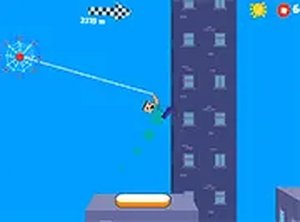
Noob's Web Swing: Obstacle Arcade puts you in control of Noob, a superhero-in-training navigating a big city. Using a mouse or touchscreen, you tap or click to shoot a web and attach to a surface, then release to swing forward. The core loop is simple but demands precise timing: attach, swing, release, and repeat. Each successful swing builds momentum, and misjudging a web shot can send you into a wall or gap. The game is designed for all ages, with no violence or inappropriate content.
Level Goals and Progression
Every level scatters shiny badges that serve as your primary collectible. Grabbing badges earns points and contributes to unlocking new costumes for Noob. To advance, you must complete all challenges within a level—typically a mix of collecting badges and reaching the end without crashing. Obstacles like walls and gaps force you to plan your route. As you progress, levels introduce tougher layouts that demand faster reflexes and cleaner web timing. The difficulty curve is gradual, making it approachable for newcomers while still offering a test for seasoned players.
Controls and Accessibility
The game runs directly in your browser with no downloads or installations. It works on both desktop and mobile devices, and you can switch to full screen for a wider view. The control scheme is identical across platforms: a single tap or click handles both shooting and releasing webs. This one-button design keeps the game accessible to younger players and casual users, while the timing-based challenge provides depth for those seeking skill improvement. There is no penalty for experimenting, so you can practice swings freely.
Costumes and Replay Value
Unlockable costumes give Noob a visual change and serve as a reward for collecting badges. While the game does not specify how many costumes exist, the progression system encourages replaying levels to gather more badges. Since levels are short and restart instantly, the game suits quick sessions. The family-friendly theme and lack of explicit content make it a safe choice for shared play. Regular practice sharpens your reflexes and helps you complete the more demanding later levels.










Editorial Notes