Palette Play: Coloring Fun
Reviews
Palette Play: Coloring Fun is a straightforward browser coloring game that prioritizes accessibility over challenge. Its tap-to-fill segments, minimal interface, and lack of timers make it easy for young children to use independently. The cartoon-style artwork and full-screen mode support a relaxed pace. The main limitation is that each session starts fresh, so finished pictures are not saved within the game. It best suits casual players and parents looking for a low-pressure creative activity.
Description
How a Coloring Session Works
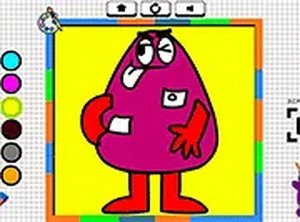
Palette Play keeps interaction to a minimum. You select a picture from a small gallery, then tap or click individual outlined segments to apply a color from the palette. The system responds instantly, so you can change a shade or try a different combination without waiting. Each image is divided into clearly marked sections, which makes it obvious where every color will land. There are no timers, scores, or penalties, and the game never pushes you to finish quickly.
Visual Style and Screen Setup
The artwork uses clean lines and bright, cheerful hues. Characters and objects are drawn in a friendly, cartoon-like manner aimed at young players. The interface stays minimal, with the color palette placed conveniently on the screen. A full-screen mode removes distractions so you can focus entirely on the coloring process. Together, these choices create a calm, inviting atmosphere rather than a competitive one.
Playing Across Devices
Because Palette Play runs entirely in a web browser, there is no software to install and no account to create. It works on mobile phones, tablets, and desktop computers. Touch controls respond well on smaller screens, while mouse clicks suit larger displays. Each session starts fresh with a new image selection, so you can switch between devices without carrying over progress.
What Young Players Practice
Although it is primarily a leisure activity, the game offers subtle learning benefits. Children practice hand-eye coordination by targeting specific sections. They also build color recognition and decision-making skills as they choose which shades to apply. The open-ended structure encourages independent play, letting kids explore their own artistic preferences without adult guidance. Parents can feel comfortable letting children use the game unsupervised.










Editorial Notes