Spot the Detail Challenge with Tom
Observation Puzzle Family-Friendly Casual Brain Training Attention to Detail
Spot the Detail Challenge with Tom
174
Developer: Power Pixel Dev
Updated: 2026-07-21

Reviews

Spot the Detail Challenge with Tom stands out for its polished visual presentation and well-paced difficulty progression. The early levels build confidence, while later stages demand genuine attention to subtle changes in color and shape. The absence of penalties for wrong taps keeps the mood relaxed, and the star system provides a clear goal without pressure. Playing on a larger screen with full-screen mode enhances the experience, as tiny mismatches become easier to spot. This is a thoughtful take on the classic spot-the-difference formula that respects the player's time and focus.

Description

Picture Comparison Basics

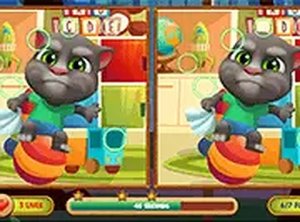
Two images appear next to each other on the screen. At first glance they look identical, but small details have been changed in one of them. A flower might be a different color, a cloud could shift position, or a hat might disappear. The player taps or clicks on the area where a mismatch is spotted. Each level has a set number of these hidden differences to locate. The game registers every correct find with a visual cue, so progress is always clear. This straightforward setup makes it easy for anyone to start playing without reading lengthy instructions.

Progression and Difficulty Curve

Early levels present obvious mismatches that stand out quickly, helping new players build confidence. As the player advances, the differences become more subtle and require closer inspection. Later stages might involve changes in shading, object size, or background elements that blend into the scene. This gradual increase in complexity keeps the experience engaging without becoming frustrating. The star rating system rewards thoroughness, encouraging players to revisit earlier levels and improve their speed. Unlocking new stages feels satisfying because each one introduces a slightly different visual puzzle.

Visual Style and Character Appeal

The illustrations feature a friendly character named Tom, whose expressive face and colorful surroundings create a warm, inviting atmosphere. Scenes include playful settings like a garden, a kitchen, or a playground, each filled with small details that reward careful looking. The art style uses bright, clear lines and soft colors, making it easy on the eyes during longer play sessions. This visual approach suits both children and adults, as the images are charming without being childish. The consistent quality of the artwork ensures that each level feels like a new little world to explore.

Platform Accessibility

The game runs directly in a web browser on both mobile phones and desktop computers. No software installation or account creation is required. Players can switch between devices seamlessly because progress is saved locally. A full-screen mode is available to remove distractions and enlarge the images, which helps when searching for tiny mismatches. The touch controls on mobile devices respond accurately, and mouse clicks work just as well on a laptop. This flexibility means the game fits naturally into short breaks or longer relaxing sessions at home.

Feedback and Encouragement

When a difference is found, a brief animation highlights the spot and a pleasant sound confirms the discovery. This positive reinforcement keeps the player motivated to continue searching. If time is running low, a subtle visual cue appears without causing alarm. The interface remains clean and uncluttered, with only essential information displayed on screen. There are no intrusive ads or pop-ups during gameplay, which preserves the calm atmosphere. The overall design prioritizes a smooth, uninterrupted experience that respects the player's focus.

Compatibility

▸ Desktop: Chrome / Edge / Firefox / Safari
▸ Mobile: iOS Safari / Android Chrome
▸ Tablet: iPadOS Safari / Android Tablet Browser
Keep your browser updated for the best experience

Faq

Can I play Spot the Detail Challenge with Tom on my tablet?
Yes, the game works on any device with a modern web browser, including tablets. The touch interface is optimized for finger taps, and the images scale to fit the screen size. No app download is needed.
How many differences do I need to find in each level?
The number varies per level, typically ranging from five to ten differences. The exact count is shown at the start of each stage, so you know how many mismatches remain to be discovered.
Is there a penalty for making wrong taps?
No penalty is applied for incorrect taps. The game simply does not register a find, and you can continue searching. This design keeps the experience stress-free and encourages exploration.
Does the game save my progress if I close the browser?
Progress is saved automatically in your browser's local storage. When you return, you can continue from the last unlocked level. Clearing browser data may reset this progress.
Are there any in-app purchases or hidden costs?
No. The game is completely free to play with no purchases, subscriptions, or premium features. All levels are accessible without any payment.
What happens when the timer runs out?
The level ends, and you can try again immediately. There is no limit on retries, so you can practice the same stage until you find all differences and earn a better star rating.

Comments

0 comments
U
User
Loading comments...