Toca Coloring Book Online
Reviews
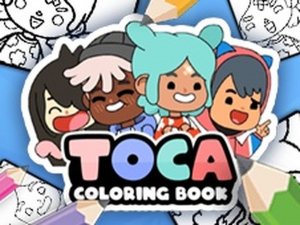
Toca Coloring Book Online is a straightforward browser coloring activity aimed at young children. Its strengths are the absence of downloads, a family-friendly design, and two distinct modes that suit different levels of precision. The 26 drawings offer enough variety without overwhelming. The main limitation is the fixed set of pictures and the lack of an undo for paint bucket fills. It suits parents looking for a calm, creative online task for kids.
Description
What You Can Color
The game offers 26 distinct drawings that pull from the Toca Boca universe. Expect friendly characters and everyday objects rather than complex scenes. The selection is broad enough to give children real choice each time they open the page, but small enough that they can eventually try every picture. Because the theme stays consistent, kids who already enjoy Toca Boca stories will recognize the visual style immediately.
Two Ways to Fill a Picture
Before coloring, players pick a mode. Colored pencils mode supplies crayons, an eraser, and a magnifying glass. The magnifying glass is the detail tool—it helps a child zoom in on small areas where a crayon tip would otherwise be too wide. Paint bucket mode works differently: a single click fills an entire section with one flat color. That makes it the faster option for large backgrounds and the neater option when a child wants clean edges without careful tracing. Switching between modes is the main strategic decision, and it changes how much control versus speed a child gets.
Why It Stays Simple
There is no timer, no score, and no fail state. A child chooses a drawing, applies colors, and can erase mistakes in colored pencils mode. The paint bucket cannot be undone the same way, so younger players may prefer starting with crayons until they are comfortable. The entire experience runs in a web browser without any download, which means a parent can open it on a shared computer or tablet and close it just as quickly. The content is designed to be family-friendly, with no violent or inappropriate themes.
Building Skills Through Play
Coloring in either mode works on fine motor control and color recognition. The magnifying glass encourages attention to small details, while the paint bucket teaches children to plan which areas should share a color. Because there are no wrong answers, kids can experiment with unusual combinations and see the result immediately. The 26 drawings give enough variety to keep the activity fresh without overwhelming a young player with too many options at once.
Compatibility
Faq
Does Toca Coloring Book Online require a download or account?
What is the difference between colored pencils mode and paint bucket mode?
How many drawings are available in Toca Coloring Book Online?
Is Toca Coloring Book Online safe for young children?
Can I undo a color applied with the paint bucket?
What skills does coloring in this game help develop?
More Like This

Island Restoration Adventure Game

Cube Merge Flip Puzzle

Style Studio: Fashion & Art Creator

Rope Hero 3D: Casual Puzzle Adventure

Window Leap Hero Arcade
Kids Puzzle Challenge: Brain Training

Bread Pit 2: Toast Puzzle Journey

Ear Care Puzzle Quest

Safety Hero: Rescue Puzzle

Editorial Notes